How to Delete a TikTok Video
Sometimes we put out an embarrassing TikTok video, which doesn’t do well and you just need to delete it…
Well I am going to show you how to do that in this tutorial.
So buckle up and let’s go.
Delete your TikTok Video
Overall this is a really easy tutorial, that anyone can do. So let’s keep this as simple as possible. Here are the steps.
Select your TikTok video you want to delete.
Select the “More Settings” option - it often looks like three dots.
Swipe across the menu, until you see the option to “Delete”.
Delete your TikTok video and you’re done!
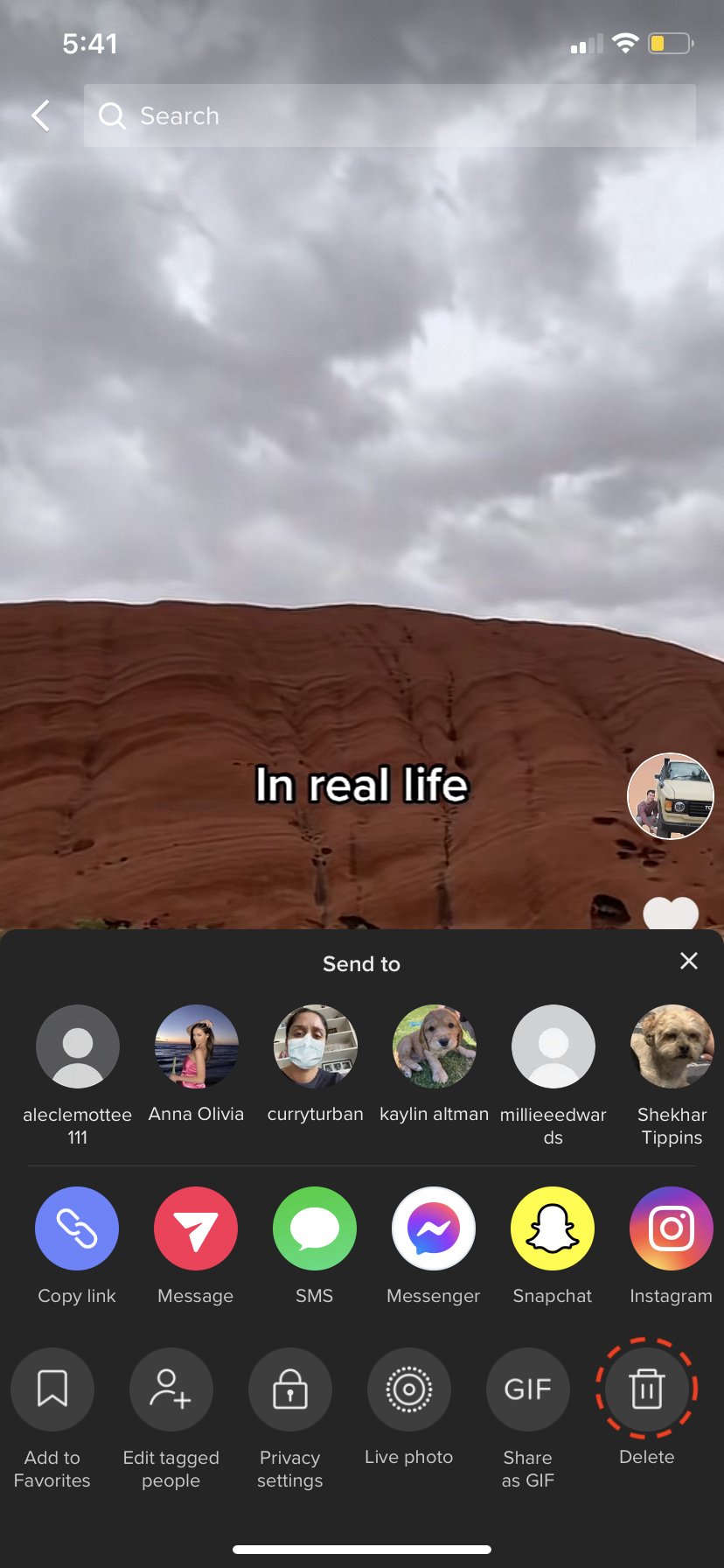
This is the magical delete button you’re looking for.
While you’re here - I actually filmed a great video on how to promote your TikTok video, you might find it handy.
Thanks for reading guys!
I am on a mission to build a career out of the content I create! If you have had value from my blogs, videos or content - you can support me by buying me a coffee.
Even a small donation goes a long way, in helping me continue making content for you 😊
It really is that easy.
If you still need help, I recorded this video on how to delete your TikTok video. Feel free to watch it if you feel you need the help.